BIZZ WIZZ MENU
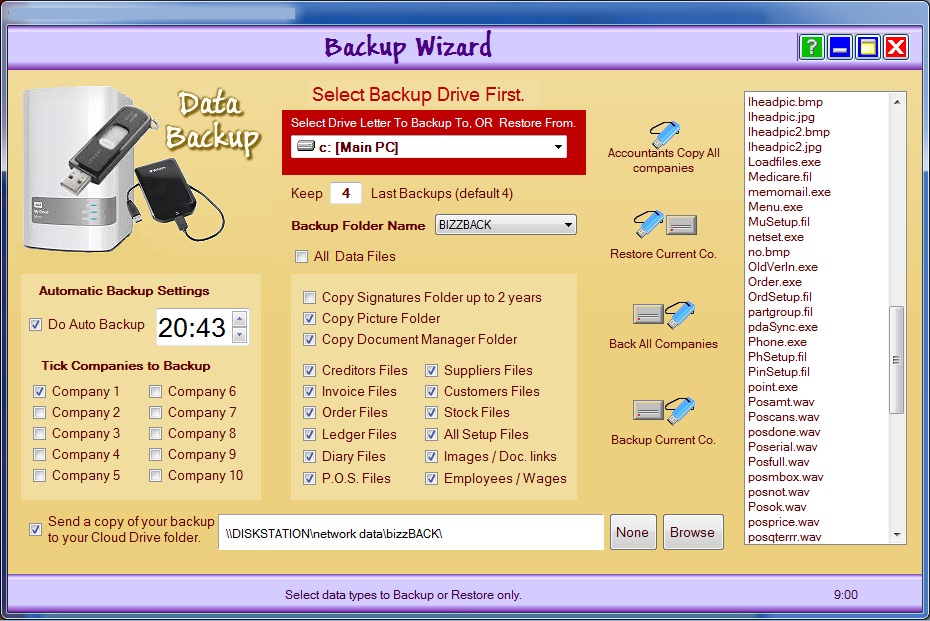
BACKUP SCREEN
Bizz Wizz : Setup , Main Menu , Ledger , Phone Book , Invoice Book , Stock Book , Order Book , Creditors , Point of Sale , Business Name , Diary , Document Manager , Unlock , Backup
See Also : Menu , Purchase, Unlock , Backup , Load Old Version Data
NOTE: By moving the mouse over the buttons, the help box at the bottom of that screen will give you a brief description of the function of that button.
The backup window has 4 main ways to backup or restore Plus a
lot of options.
***
First set the Data Drive to the drive you wish to Backup to OR Restore from..***
This can be a memory stick , hard drive or mapped network drive.
BACKUP FOLDER NAME: As in the past
versions of BizzWizz all backups were sent to the "C:\BizzBack\"
folder
The drive letter was changeable but not the folder name we now give you 3 more
names.
AUTOMATICALLY BACKUP:
A backup can also be done automatically we will start with this option
To do an auto backup just tick the Do Auto Backup option and set the time
to the time you would like the backup to start.
NOTE The BW main menu or tool bar must be running for the timer to work
and the backup window closed.
MASTER SETUPS FOR ALL BACKUP:
Next tick the Companies you wish to backup. (Auto and Back All
Companies and Accountants Copy only
If you wish to also backup Pictures and Documents tick also the Copy Picture
Folder and the Copy Document Manger Folder options also.
You may also like to set the Keep ?? last Backups to set the number of
old backups to keep before they are overwritten. (set to keep 4 is the best)
Do Not Forget to set the Data Drive to the drive you wish to backup to.
NOTE All Data Files option Must be ticked as a default and only un-ticked
for special backups.
Accounts Copy All Companies:
This button is use to take your data to the accountant on a memory stick which
has a self running Ledger so the accountant will not need the Software.
If your accountant is using Windows XP and not Windows Vista or
win7, they
may have to load the " 0_DotNet.exe " on the memory stick First.
Windows will say there is a dot net error if it needs to be loaded.
To run the Accountants Copy Ledger run from the folder "Bizz-Wizz \
bizzwizz## \ Company* \ 0-Ledger.exe "
## = your version
* = Company number
Restore Current Co.:
Danger: Data can be lost
if the backup is older than the current data.
Danger: You Must Be in (loaded) the company you are
restoring .
Note:
You can
only restore one company at a time
This button will Restore the last Backup for the Company you are
currently in .
It is a good idea to ring BW to check you are doing the right thing by restoring
the data ( a phone call can cost less! )
Or just never Restore without BW's help.
Backup All Companies:
This will Backup all Ticked companies on the left side of the screen.
Backup current Company:
This will Backup the current company you are in (loaded)
Send a copy of you backup to your Cloud Drive Folder.
Browse for your cloud folder and tick to send a copy.
This option is a second copy of the backup and is done when the main backup is
done.
You do not have to send to the cloud, instead you could just send to a network
folder ect.!
See Also : Menu , Purchase, Unlock , Backup , Load Old Version Data