
How to set up more Companies. (Down loads from web)
How to Network Bizz Wizz. (Down loads from web)
BIZZ WIZZ SETUP SETTING UP COMPANIES
Bizz Wizz : Disclaimer , CD Setup , Main Menu , Ledger , Phone Book , Invoice Book , Stock Book , Order Book , Creditors , Point of Sale , Business Name , Diary , Document Manager , Unlock , Backup , PDA Invoicing , PDA Syncing to PC , Installing and setup PDA
See Also : Menu, Purchase, Unlock, Backup, Networking, Load Old Version Data
|
|
NOTE : Videos are from
older version But will still show the basics on how to this setup.
How to set up more Companies. (Down loads from web) How to Network Bizz Wizz. (Down loads from web)
|
NOTE:
By moving the mouse over the buttons, the help box at the bottom of that screen
will give you a brief description of the function of that button.
SETTING UP
COMPANIES
Please read all pop up massage boxes and answer
correctly !
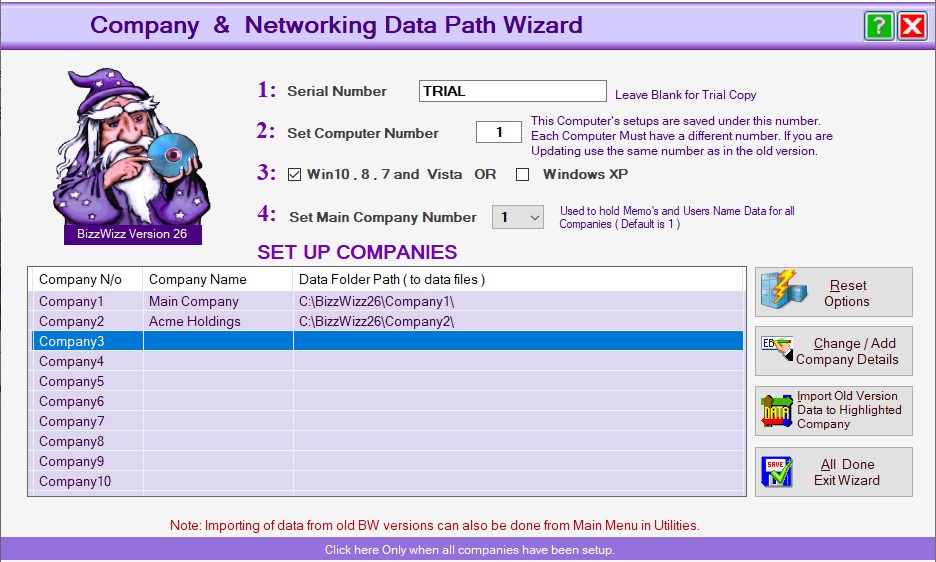
Setting up Companies is done with the Company
Wizard
This window is also used when loading the Program for
the First Time to set the Serial Number and the Computer Number
1: Enter the Serial Number Supplied OR look on the CD if you have
one. If you can not find your number contact BW
within 30 days and just leave blank for now.
2: The Computer Number must be a different number on each computer on a
network. This Number is used to keep the setup for that computer so
should only be changed at setup time.
Note the number is for the computer and will not changed with more
than one company.
If you are updating from an older version keep the same computer
number as the last version.
3: Win7, 8, 9, 10 or XP : Windows has a bug in the list view control (
'because they can that why' ) and it will not refresh in XP so we have put in a
fix which is only needed in XP not in Vista. So if you have XP tick that box.
4: Set Main Company Number : When using memo
mail with multiple companies you need to set one of the companies as the default,
so you get your memos no matter what company your
working in.
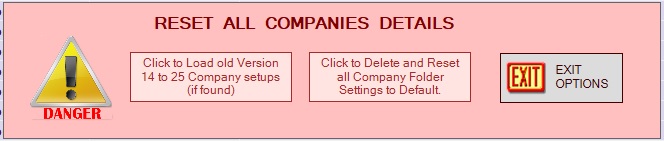
RESET OPTIONS button : This lets you redo company setups from scratch.
CHANGE ADD COMPANY DETAILS button: The next Steps may need to be repeated for each company and if networking the path may also need changing.
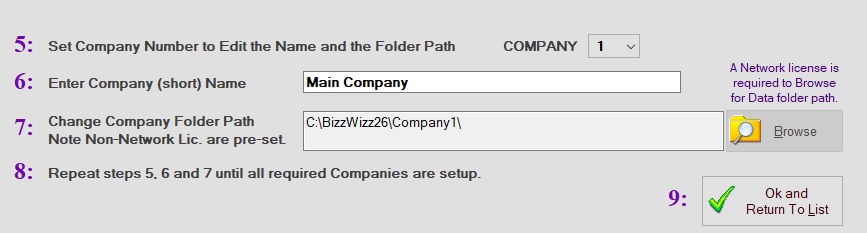
5: Company Number Select company your changing, then go to step 6 and give it a name...
6: Company Name: Enter a short name for this company the shorter
the better ie. Bizz Wizz Software Pty Ltd = [ BizzWizz ] or = [ BWS]
7: The Company Path is Pre-Set unless you have a network license, Then
you will be able to Browse for the network path to where the data is stored on
the network.
8: If you need to add more companies Repeat step 5: by picking company
next number for
the next company. Then go to step 6: and step 7:.
You can have up to 10 companies.
9: When all set press Ok and Return to list button .
IMPORT OLD VERSION DATA button :
When the [Load Old Version Data] Button is pressed a message box
will show this box will ask which old version of Bizz Wizz you were using
so the data can be upgraded to the new version.
If you are NOT using an older version then exit now as this is not needed to
update same version.
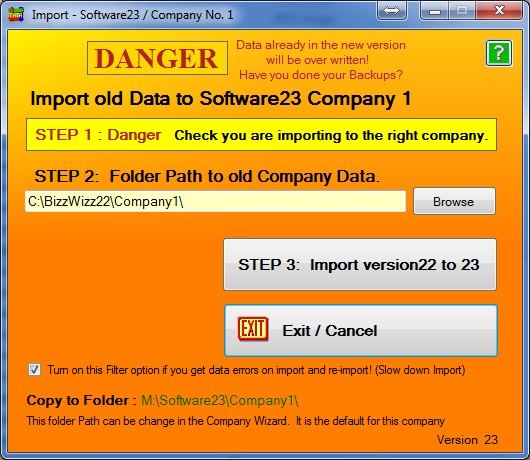
Follow the steps to import your old Bizz Wizz data
Step 1: Just check the company name above the step that you are importing
the right company.
Step 2: Check or Set the folder path to the data to be Imported.
Step 3: Press this button to do the Import.
See Also : Menu, Purchase, Unlock, Backup, Networking, Load Old Version Data